Card-testing attacks on donation forms: how to spot one in five minutes
Card-testing attacks target charity donation forms because they're an easy mark. Here are the five fingerprints to check for in the next five minutes and what to do if you spot one.
Cause Shield
June 4, 2026·8 min read
Five minutes ago, somewhere on the internet, a fraudster ran two hundred small charges through a charity's donation form. The amounts were $1 or $2.50 small enough that nobody noticed in real time. The charity's bank statement will show two hundred successful donations. Stripe will show a normal-looking burst of activity. And three weeks from now, when the chargebacks start arriving, the charity's finance director will spend two days figuring out what happened.
If this sounds like a problem only large organisations have, look at the size of the charities reporting card-testing on the Funraisin, Raisely and Classy support forums. It happens to small charities constantly. They're attractive targets precisely because they're small: fewer fraud teams watching, fewer rules in Stripe Radar, donation forms that accept any amount, and a charitable mission that makes everyone hesitant to flag something that looks like a small gift.
Here's how to check, in the next five minutes, whether it might already be happening to yours.
What card-testing actually is
Card-testing is exactly what it sounds like: someone who's bought a list of stolen credit card numbers needs to know which ones are still active before reselling them or using them for a larger fraud. They run a small charge through any payment form they can find. Donation pages are popular because they accept arbitrary amounts and the merchant is unlikely to call the cardholder to verify a $1 gift. A successful charge means the card is live. A decline means it's been cancelled. The fraudster keeps the live ones; everything else is signal.
You don't lose the donation amount directly, Stripe processes it. But you pay processing fees on every charge, and several weeks later you'll get chargebacks on the fraudulent ones, each carrying a fee of around $15–25 on top of the original amount. A two-hundred-charge testing burst that produces thirty chargebacks can cost a small charity north of a thousand dollars before fraud teams intervene. Several charities have reported multi-thousand-dollar swings from a single attack.
The five fingerprints
These aren't subtle once you know what you're looking at. Open your Stripe dashboard (or your fundraising platform's transaction view) and check each of these.
1. A burst of small donations from the same card range. Card-testers usually work through a list in sequence. That means a cluster of charges where the first six digits of the card number — the BIN, or bank identification number — are identical or very close. Stripe lets you see the BIN on each transaction; if you see twenty donations of $1 to $5 in a ten-minute window all starting with the same six digits, that's not twenty different generous donors all picking the same amount. That's one fraudster.
Where to check: Stripe → Payments → filter to the last 24 hours, sort by amount ascending. Look at the first six characters of "Card" on each row.
2. A spike in declined or failed transactions. For every card that's still live, the fraudster's list has five to ten that have been cancelled. So a card-testing run produces a much higher rate of declined transactions than your normal donation pattern. If your usual decline rate is one or two per day and you suddenly see fifty declines in an hour, that's the noise of the testing process surrounding the few successful charges.
Where to check: Stripe → Payments → filter by Status: Failed. Look at the date stamps. Clusters within a single hour are the tell.
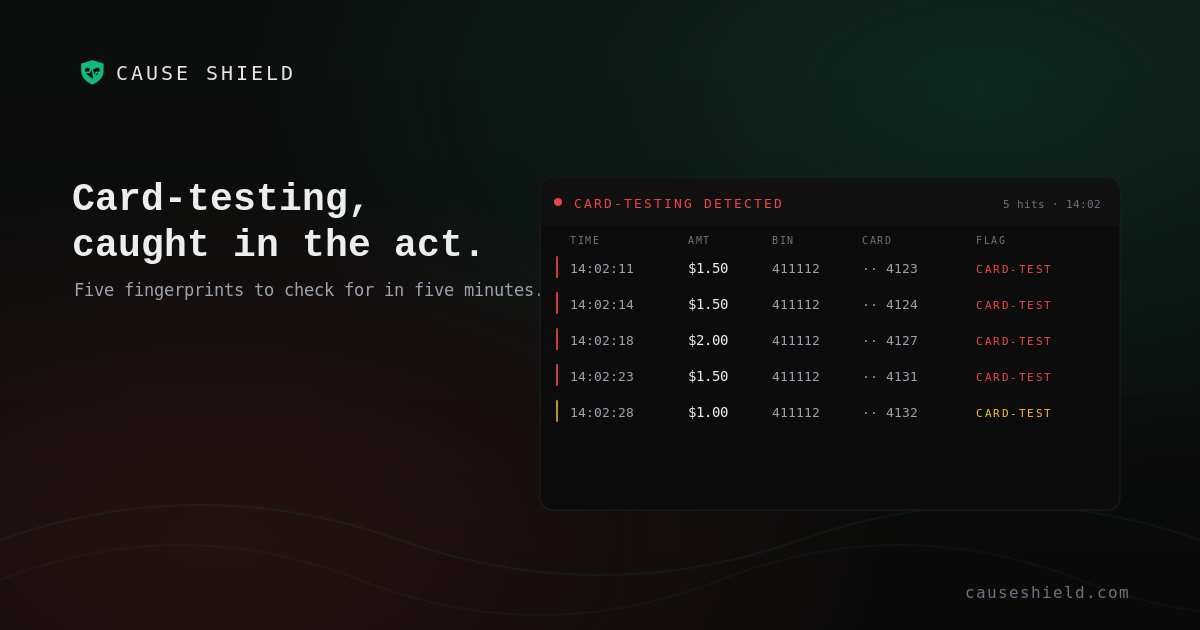
3. Sequential card numbers tested in rapid succession. When the fraudster's list is sorted (often by issuer or BIN), you'll see card numbers being attempted whose last-four digits are sequentially close; 4123, 4124, 4127, 4131, and so on, all within seconds of each other. Legitimate donors don't coordinate phone calls about donating $1.50 within thirty seconds of each other on cards from the same bank.
Where to check: same Stripe view as above. Look at the "Card" column and watch for last-four sequences appearing close in time.
4. Geographic mismatches between IP and card country. Most donation forms log the donor's IP address on submission. Card-testers usually run their attacks from VPNs or compromised servers, often in countries different from the card's issuing bank. If you're an Australian charity and you see donations from cards issued in Brazil being submitted from IP addresses in Vietnam, that's not your overseas donor base.
Where to check: some platforms expose this directly; for others you'll need to cross-reference your form's submission log against the card's issuing country. If you don't have this data at hand, that's itself a finding, it means you can't currently see this signal at all.
5. Refunds and chargebacks arriving in a cluster days later. This is the lagging indicator. Chargebacks for the original fraudulent attempts arrive one to six weeks after the testing run. If you see a sudden cluster of chargebacks all referencing donations from the same week, your earlier card-testing run is being unwound. By this point the damage is done, you've already paid the chargeback fees and the cards have been resold for real fraud, but the cluster pattern confirms exactly what happened.
Where to check: Stripe → Disputes. Look at the dispute creation dates and the underlying charge dates. If most of the original charges fall in the same 24-hour window weeks earlier, you experienced a card-testing event then.
The five-minute version
If you only have five minutes right now, run this:
- Open Stripe → Payments. Filter to the last 7 days. Sort by amount ascending. Look at the top 30 rows. Do you see clusters of $1–5 donations within the same hour? That's signal one.
- Filter to "Failed" status, last 24 hours. Is the count abnormally high — say, ten times your usual decline rate? Signal two.
- Scan the BIN columns on the small-donation cluster. Are several rows starting with the same four to six digits? Signal three.
- Open your fundraising platform's submission logs (Funraisin, Raisely, Classy, etc.) for the same window. Do the IP addresses match where you'd expect your donors to be? Signal four.
- Open Stripe → Disputes. Look at chargeback creation dates. Any clusters in the last month? Signal five.
If three or more come back positive, you're probably looking at a card-testing event. If one comes back positive on its own, it might just be noise — investigate but don't panic.
What to do if you find it
Three immediate moves:
- Turn on Stripe Radar's "Block payments that fail card-testing checks" rule. It's free, takes thirty seconds, and catches most repeats of the same attack.
- Add a minimum donation amount of $5–10 on your form. Most card-testers use $1 because it's the lowest amount most processors will accept; raising the floor breaks their automation immediately.
- Add a reCAPTCHA or similar bot check to your donation form. It won't stop a determined human attacker, but it stops the vast majority of automated scripts cold.
Then think about ongoing monitoring. The five-minute audit catches what's already happened; it doesn't tell you about the next attack starting tomorrow at 2am while you're asleep.
What good ongoing monitoring looks like
You want three things from a monitoring layer, regardless of which tool you use:
- Real-time scoring. Each donation evaluated as it arrives, not at the end of the day, so you can act on a card-testing burst inside the burst itself rather than reading about it in next month's chargeback report.
- Pattern recognition across signals. A single $1 donation isn't suspicious; thirty $1 donations from the same BIN in a ten-minute window is. The monitoring needs to see the pattern, not just individual transactions in isolation.
- A clear escalation path that doesn't depend on you watching a dashboard. The right person should get an email or a Slack message within minutes of a suspected attack — not when they happen to check the system tomorrow.
This is what Cause Shield does. We watch every donation that comes through your connected Stripe account in real time and score it against the five signals above plus several more — card-testing bursts, BIN clusters, geographic anomalies, refund and chargeback velocity, suspected device fingerprints. When something looks wrong, we tell you in plain English, before it costs you a thousand dollars in chargebacks. When everything's fine, we tell you that too, so you can stop checking.
It flags and alerts; the decision to act always stays with you. We're not a payment processor and we can't stop a transaction mid-flight — but we can make sure you know about a card-testing run within minutes, not weeks.
If you want to see how this looks on your own data, the 14-day free trial connects to Stripe in about three minutes and shows you any card-testing patterns in the last 90 days of your transactions. Read-only, no commitment, donor PII minimised by default, cancel any time.
Tags